Explainer
What is change data capture (CDC)? How it works and when to use it
Change data capture copies only the inserts, updates and deletes from a source database instead of reloading whole tables. Log-based, query-based and trigger-based CDC, common tools, applying changes with MERGE, and pitfalls.

Hemant Walchale
· 3 min read
Change data capture (CDC) keeps a copy of a database up to date by moving only what changed (inserts, updates and deletes) instead of reloading entire tables. It is how modern data platforms stay minutes behind operational systems without putting heavy load on them.
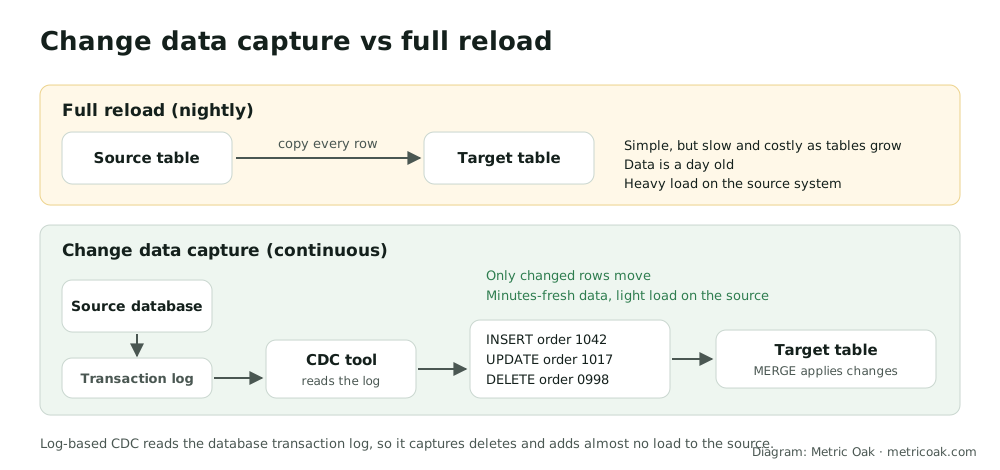
Why not just reload everything?
Full reloads are simple, and fine for small tables. As tables grow they become slow and expensive, the data is only as fresh as the last reload, and every reload puts heavy read load on the source system, often a production database. CDC moves a tiny fraction of the data and can run continuously.
Three ways to capture changes
| Method | How it works | Pros | Cons |
|---|---|---|---|
| Log-based | Reads the database transaction log | Captures deletes, preserves order, minimal source load | Needs log access and configuration |
| Query-based | Queries rows where a “last updated” timestamp is newer than the last run | Simple, no special access | Misses deletes, depends on reliable timestamps, polls the source |
| Trigger-based | Database triggers write changes to a side table | Works without log access | Adds load to every write, harder to maintain |
Log-based CDC is the standard choice for production systems.
Common tools
- Open source: Debezium, running on Kafka Connect.
- Commercial replication: Oracle GoldenGate, Qlik Replicate, Fivetran, AWS Database Migration Service.
- Built into platforms: Databricks Lakeflow Connect, Microsoft Fabric mirroring, and connectors for Snowflake.
Applying changes in the target
Changes arrive as a stream of insert, update and delete events, which have to be applied in the right order:
- A
MERGEstatement updates matching rows, inserts new ones and deletes removed ones. - Declarative options handle ordering and history for you:
AUTO CDCin Lakeflow Declarative Pipelines (including slowly changing dimension type 2), or Streams and Tasks in Snowflake.
Pitfalls to plan for
- The initial snapshot. CDC starts from a full copy, then applies changes from that point; the two must line up.
- Schema changes in the source (new or renamed columns) must flow through without breaking pipelines.
- Ordering and duplicates. Events can arrive late or twice; apply them by a sequence number, not arrival time.
- Log retention. If the CDC tool falls behind longer than the database keeps its logs, changes are lost and a re-snapshot is needed.
- Deletes. Decide whether the target removes rows or marks them as deleted for history.
The short version
Change data capture moves only changed rows, ideally by reading the database transaction log, and applies them with MERGE or a declarative feature such as AUTO CDC. It keeps data fresh with little load on the source, provided you plan for the initial snapshot, schema changes, ordering and log retention.
CDC is central to most migrations, for example Oracle to Databricks and SQL Server to Snowflake. See also medallion architecture and our cloud data migration service.
Sources
- Debezium documentation
- The AUTO CDC APIs: simplify change data capture, Databricks documentation
- Introduction to streams, Snowflake documentation
Not sure where your own platform stands? Take the free 3-minute data platform scorecard. Unfamiliar terms are explained in the data engineering glossary.