Explainer
What is Unity Catalog? Databricks governance explained
Unity Catalog is Databricks' governance layer for data and AI: one place for permissions, row filters and column masks, lineage, auditing and discovery across workspaces. How it is organized, what it governs and how to adopt it.

Hemant Walchale
· 3 min read
Unity Catalog is the governance layer of Databricks: one place to control who can access which data and AI assets, to mask sensitive data, to see where data came from, and to audit who used it, across every workspace in a region.
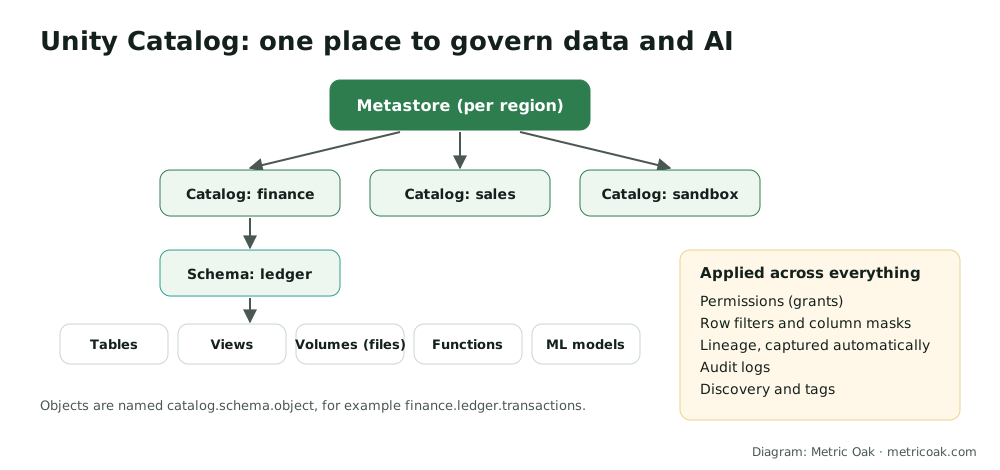
How it is organized
- Metastore: the top-level container, usually one per cloud region, shared by the workspaces in that region.
- Catalogs: the first level of the namespace, typically one per business domain or environment (for example
finance,sales,dev). - Schemas: groups of related objects within a catalog.
- Objects: tables and views, volumes for files, functions, and registered machine learning models.
Every object is addressed as catalog.schema.object, for example finance.ledger.transactions.
What it governs
- Permissions: standard SQL
GRANTandREVOKEon catalogs, schemas and objects, inherited down the hierarchy and assigned to groups from your identity provider. - Fine-grained access: row filters (each user sees only the rows they are allowed to) and column masks (sensitive values hidden or partially shown).
- Lineage: captured automatically down to column level for queries run on Databricks, so you can trace any table or dashboard back to its sources.
- Auditing: every access is logged, with system tables you can query for usage, audit and billing.
- Discovery: search, descriptions, tags and ownership so people can find trusted data.
- Sharing: Delta Sharing to share data securely with other organizations and platforms.
Why it matters
Before Unity Catalog, permissions lived in each workspace’s Hive metastore, so the same table could have different rules in different places, and there was no central lineage or audit. Unity Catalog makes governance consistent across workspaces and covers AI assets (models, functions, files) as well as tables, which matters as more teams build AI on the same data.
Adopting it
- Design the namespace: decide what catalogs represent (domains, environments or both) before creating objects.
- Map groups to permissions: grant to groups, never individuals, and follow least privilege.
- Classify sensitive data and apply masks and row filters to it.
- Upgrade from the Hive metastore: use the Databricks Labs UCX tool to assess and upgrade tables, grants and jobs.
- Use the system tables for usage, audit and cost reporting.
The short version
Unity Catalog gives Databricks one governance layer: a catalog.schema.object namespace, permissions and fine-grained access, automatic lineage, auditing and discovery for both data and AI assets, consistent across workspaces.
Related: what is a data lakehouse, what is data lineage, RAG on enterprise data: keeping permissions intact and our data quality and governance service.
Sources
- What is Unity Catalog?, Databricks documentation
- Unity Catalog open-source project
- UCX: Unity Catalog migration assistant, Databricks Labs
Not sure where your own platform stands? Take the free 3-minute data platform scorecard, or see how we work on Databricks. Unfamiliar terms are explained in the data engineering glossary.