Cost
Databricks pricing explained: DBUs, compute types and what you really pay
How Databricks pricing works: what a DBU is, list prices by compute type, classic versus serverless, cloud VM and storage costs, worked examples, discounts and how to see your own spend.

Hemant Walchale
· 4 min read
Databricks bills are easy to misread because the price you see on a pricing page is only one of four numbers that make up the bill. This guide explains each one, with typical list prices, two worked examples, and where the money usually goes.
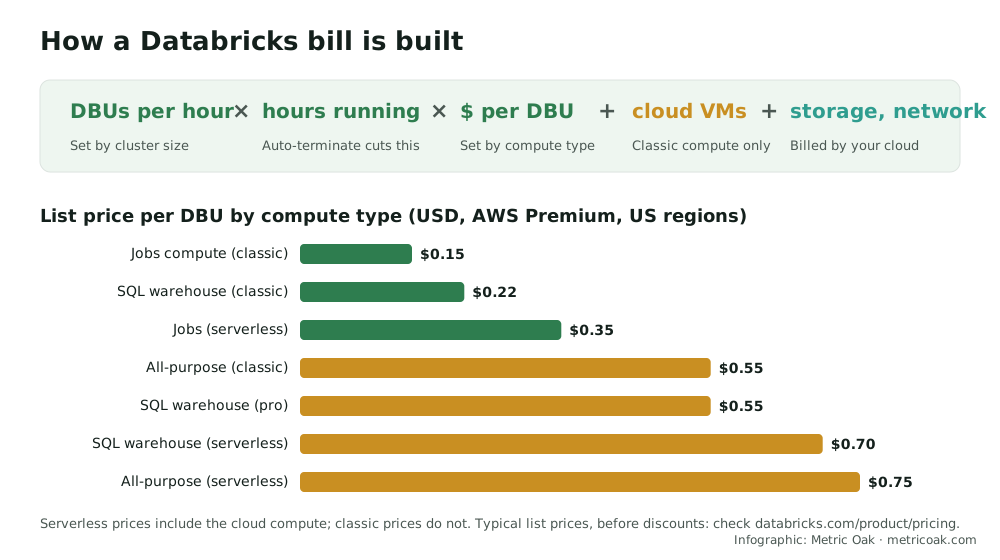
The four parts of a Databricks bill
- DBUs per hour. Every cluster and SQL warehouse consumes Databricks Units (DBUs) at a rate set by its size and instance type. Bigger clusters, and Photon-enabled clusters, consume more DBUs per hour (Photon usually finishes the work faster, so the total can still be lower).
- Hours running. You pay for the time compute is up, including idle time before auto-termination or auto-stop.
- Price per DBU. Set by the compute type, your pricing tier, cloud and region. The spread is large: classic jobs compute is the cheapest, interactive all-purpose compute is about three to four times the price.
- Cloud infrastructure. On classic compute you also pay your cloud provider for the virtual machines. Serverless prices include them. Storage (your object storage) and network egress are always billed by the cloud provider.
Typical list prices per DBU
On AWS, Premium tier, US regions, typical list prices are:
| Compute type | Typical list price per DBU | Includes cloud VMs? |
|---|---|---|
| Jobs compute (classic) | $0.15 | No |
| SQL warehouse (classic) | $0.22 | No |
| Jobs compute (serverless) | $0.35 | Yes |
| All-purpose compute (classic) | $0.55 | No |
| SQL warehouse (pro) | $0.55 | No |
| SQL warehouse (serverless) | $0.70 | Yes |
| All-purpose compute (serverless) | $0.75 | Yes |
Prices differ by cloud, tier and region (for example, some compute types are listed higher per DBU on Azure), change over time, and are before any negotiated discount. Always check the Databricks pricing page for your setup.
Worked example 1: the same pipeline on two compute types
A nightly pipeline runs on a cluster that consumes 10 DBUs per hour, for 3 hours, every day:
- On jobs compute: 10 × 3 × 30 = 900 DBUs × $0.15 = $135 a month, plus the cloud VMs.
- On an all-purpose cluster: 900 DBUs × $0.55 = $495 a month, plus the cloud VMs, and usually extra idle time before the cluster terminates.
Same work, about 3.7 times the Databricks cost. Moving scheduled work from all-purpose to jobs compute is one of the fastest savings on most platforms.
Worked example 2: a SQL warehouse for dashboards
A Medium serverless SQL warehouse (about 24 DBUs per hour) serves dashboards 8 hours a day, 22 working days a month:
- 24 × 8 × 22 = 4,224 DBUs × $0.70 = about $2,957 a month, infrastructure included.
The two levers are size (does it need to be Medium?) and auto-stop: if the warehouse stays up for 20 extra minutes after each burst of queries, those minutes are billed too.
Discounts and commitments
Most enterprises do not pay list price. Databricks offers committed-use contracts (pre-purchased Databricks Commit Units) with discounts that grow with commitment size and term, and Databricks can also be bought through your cloud provider’s marketplace, which may count toward existing cloud commitments. Commit only after you have measured a baseline: an over-sized commitment is a cost of its own.
How to see and control your own spend
- Billing system tables:
system.billing.usageshows DBU consumption by workspace, SKU, cluster, job and warehouse;system.billing.list_pricesgives the prices to cost it. - Tags: tag clusters, jobs and warehouses by team, product and environment so every DBU has an owner.
- Cluster policies: enforce auto-termination, maximum sizes and job compute for scheduled work.
- Budgets and alerts: set them per workspace or tag in the account console.
The short version
A Databricks bill is DBUs per hour × hours × price per DBU, plus cloud VMs on classic compute and storage and network from your cloud. Use jobs compute for scheduled work, size and auto-stop warehouses deliberately, tag everything and measure from the billing system tables before negotiating a commitment.
Estimate your own bill with our Databricks and Snowflake cost calculator, see the hidden costs on Databricks, Snowflake and Fabric, or compare with Snowflake pricing. Our cloud data cost optimization service finds and removes the spend your workloads don’t need.
Sources
- Databricks pricing (official list prices by compute type, tier and cloud)
- Databricks pricing guide, CloudForecast and Databricks pricing, OWOX (independent summaries used to cross-check list prices)
Further reading from other practitioners
Not sure where your own platform stands? Take the free 3-minute data platform scorecard, or see how we work on Databricks. Unfamiliar terms are explained in the data engineering glossary.