Cost
Snowflake pricing explained: credits, warehouses, storage and the rules that drive the bill
How Snowflake pricing works: credits and editions, warehouse sizes and per-second billing, auto-suspend, serverless features, the cloud services 10% rule, storage, Time Travel and data transfer, with worked examples.

Hemant Walchale
· 4 min read
Snowflake’s pricing looks simple (you pay for credits and storage) but a handful of billing rules decide whether the bill matches the plan. This guide explains how credits, warehouses, serverless features, storage and data transfer add up, with worked examples.
Credits and editions
Compute in Snowflake is measured in credits. The price of a credit depends on your edition (Standard, Enterprise, Business Critical and above), cloud, region and contract. Typical on-demand list prices in US regions are around $2, $3 and $4 per credit for the three main editions; prepaid capacity contracts are usually cheaper. Check Snowflake pricing for your account.
Warehouses: size × time
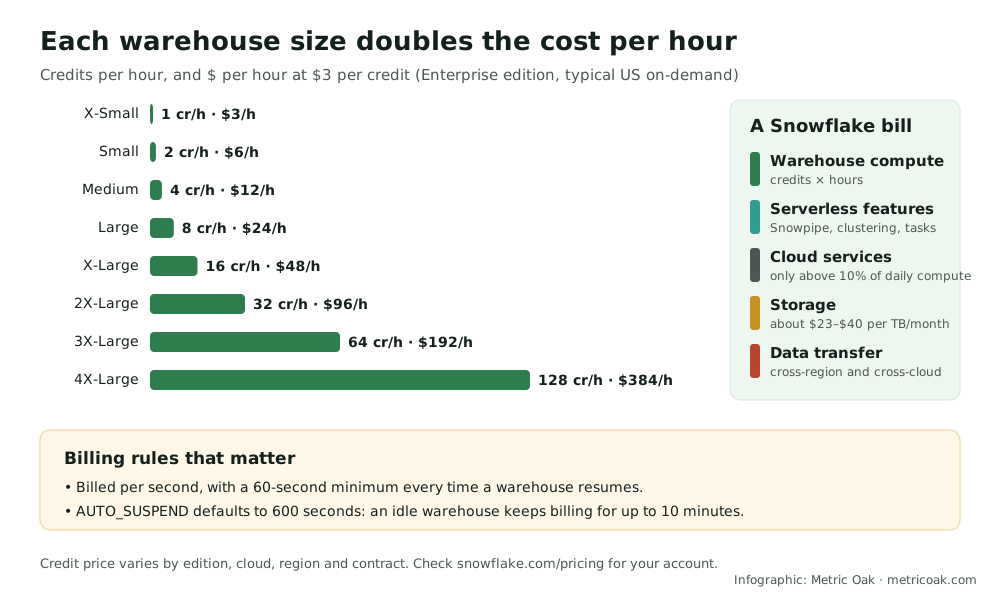
A virtual warehouse consumes credits while it runs, and each size step doubles the rate:
| Size | Credits per hour | At $3 per credit |
|---|---|---|
| X-Small | 1 | $3 |
| Small | 2 | $6 |
| Medium | 4 | $12 |
| Large | 8 | $24 |
| X-Large | 16 | $48 |
| 2X-Large | 32 | $96 |
| 3X-Large | 64 | $192 |
| 4X-Large | 128 | $384 |
Three rules decide what you actually pay:
- Per-second billing with a 60-second minimum each time a warehouse starts or resumes. Many short bursts of queries can each pay for a full minute.
- AUTO_SUSPEND defaults to 600 seconds. A warehouse that finishes its work keeps billing for up to 10 minutes before it suspends, unless you lower the setting.
- Multi-cluster warehouses add clusters under concurrency. Each extra cluster bills like another warehouse of the same size.
Worked example: a transformation warehouse
A Medium warehouse (4 credits per hour) runs transformations 6 hours a day, 22 days a month, on Enterprise at $3 per credit:
- 4 × 6 × 22 = 528 credits × $3 = $1,584 a month.
- If every run leaves the warehouse idle for the default 10 minutes, and it runs 12 times a day: 12 × 10 minutes × 22 days = 44 hours × 4 credits × $3 = about $528 more, a third on top, for no work.
Beyond warehouses
- Serverless features are billed in credits separately from warehouses: Snowpipe, automatic clustering, materialized view maintenance, search optimization, serverless tasks and replication. They are easy to switch on and easy to forget.
- Cloud services are only charged when daily usage exceeds 10% of that day’s warehouse usage.
- Storage is billed per terabyte per month on compressed data, roughly $23 to $40 depending on region and whether you have a capacity contract.
- Time Travel and Fail-safe keep historical versions of changed data, which counts as storage. Long Time Travel retention on large, frequently updated tables adds up.
- Data transfer out of a region or cloud is charged, for example when replicating or unloading across regions.
- AI features such as Cortex functions are billed by usage (for example, tokens processed).
How to see and control your own spend
- Account usage views:
WAREHOUSE_METERING_HISTORYfor warehouse credits,METERING_DAILY_HISTORYfor the cloud services adjustment, and the storage views for table storage. - Resource monitors on each warehouse to notify or suspend at a credit threshold, and budgets for serverless and AI spend.
- One warehouse per workload (loading, transformation, BI, data science), each sized and suspended separately, with query tags for attribution.
The short version
A Snowflake bill is warehouse credits (size × running time × credit price), plus serverless features, cloud services above the 10% threshold, storage including Time Travel and Fail-safe, and data transfer. Lower AUTO_SUSPEND, size each warehouse per workload, watch serverless features and measure with the account usage views.
Estimate your own bill with the cost calculator, see the hidden costs on Databricks, Snowflake and Fabric, or compare with Databricks pricing and Microsoft Fabric pricing.
Sources
- Understanding compute cost and warehouse considerations, Snowflake documentation (credits per size, per-second billing and the 60-second minimum)
- Understanding overall cost, Snowflake documentation (cloud services 10% adjustment)
- Snowflake pricing options (editions and credit prices)
- Snowflake pricing explained, Espresso AI (independent summary used to cross-check storage and auto-suspend)
Further reading from other practitioners
- Snowflake cost optimization, LatentView Analytics
- Snowflake warehouse cost optimization, XTIVIA
- Snowflake costs optimization, Beyond Key
- Proactively monitoring AI costs in Snowflake using custom budgets, Aimpoint Digital
Not sure where your own platform stands? Take the free 3-minute data platform scorecard, or see how we work on Snowflake. Unfamiliar terms are explained in the data engineering glossary.