Cost
Microsoft Fabric pricing explained: capacity SKUs, the F64 threshold and OneLake storage
How Microsoft Fabric pricing works: F SKUs and capacity units, pay-as-you-go versus reservations, pausing, the F64 Power BI licensing threshold, OneLake storage, smoothing and throttling, with a worked example.

Hemant Walchale
· 4 min read
Microsoft Fabric replaces many separate meters with one: a capacity, bought by size, that every Fabric workload shares. That makes the bill predictable, but it moves the hard questions to sizing, licensing and whether the capacity is busy enough to justify its price.
Capacities, SKUs and capacity units
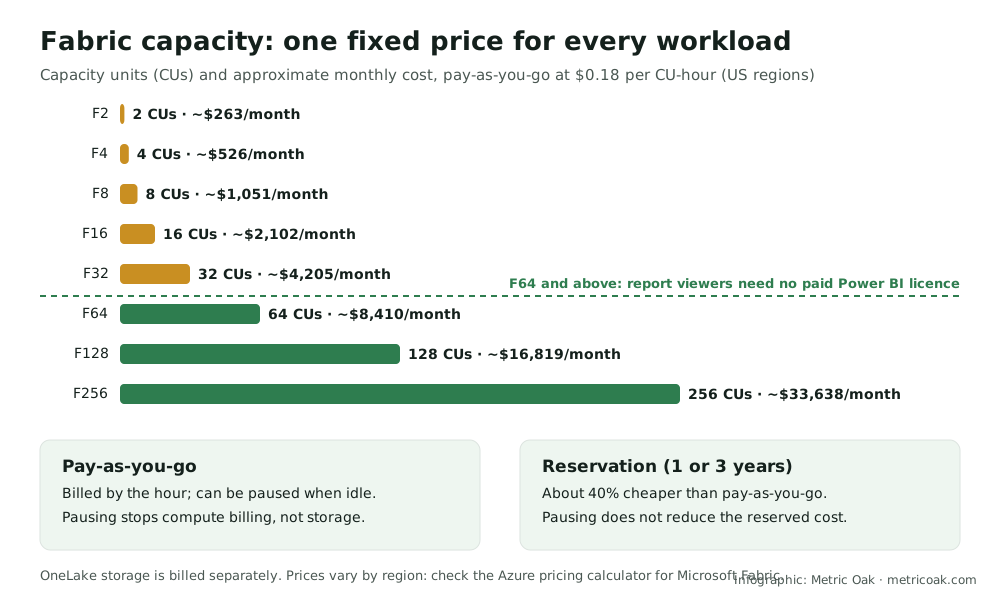
Fabric is bought as a capacity with an F SKU, from F2 to F2048. The number is the count of capacity units (CUs), the shared pool of compute that pipelines, Spark, the Warehouse, Real-Time Intelligence and Power BI all draw from.
In US regions, pay-as-you-go is about $0.18 per CU per hour:
| SKU | Capacity units | About per month, pay-as-you-go (730 hours) |
|---|---|---|
| F2 | 2 | $263 |
| F8 | 8 | $1,051 |
| F16 | 16 | $2,102 |
| F32 | 32 | $4,205 |
| F64 | 64 | $8,410 |
| F128 | 128 | $16,819 |
| F256 | 256 | $33,638 |
Prices vary by region and change over time; check the Azure pricing page for Microsoft Fabric.
Pay-as-you-go or reservation
- Pay-as-you-go is billed by the hour and can be paused, which stops compute billing. Useful for development capacities and workloads with clear quiet hours.
- Reservations (one or three years) cost roughly 40% less, but pausing a reserved capacity does not reduce the reservation cost. Reserve what runs all the time; pay as you go for the rest.
The F64 licensing threshold
Power BI licensing changes at F64:
- Below F64, everyone who views Power BI content needs a paid licence (Power BI Pro or Premium Per User).
- From F64, viewers can use a free licence; only people who create and publish content need Pro.
Worked example
An organization with 200 report viewers is choosing between F32 and F64:
- F32 plus viewer licences: about $4,205 + 200 × $14 (Power BI Pro at list price) = about $7,005 a month.
- F64 pay-as-you-go: about $8,410 a month, no viewer licences.
- F64 reserved: roughly 40% less, about $5,000 a month.
For many viewers, the larger reserved capacity is the cheaper option, and it also has twice the compute.
OneLake storage and mirroring
OneLake storage is billed separately from the capacity, at about $0.023 per GB per month (around $23 per TB) in US regions, with extra charges for disaster-recovery copies. Data mirrored into Fabric gets free storage up to a limit that grows with the SKU (for example 64 TB on an F64), which stops applying while the capacity is paused.
Smoothing, bursting and throttling
Fabric does not bill extra when a job briefly exceeds the capacity. Instead it bursts (lets jobs use more CUs than the SKU for a short time) and smooths the usage over a window: about five minutes for interactive operations and up to 24 hours for background jobs. If usage stays above the capacity, Fabric throttles: interactive queries slow down, then background jobs are delayed or rejected. Throttling is the signal to optimize the heaviest items or move up a SKU, and the Fabric Capacity Metrics app shows which items consume the most.
The short version
Fabric costs a fixed amount per capacity size, about $0.18 per CU per hour in US regions, roughly 40% less when reserved, plus OneLake storage. Size with the Capacity Metrics app, reserve what runs constantly, pause development capacities, and compare F64 with smaller SKUs plus Power BI viewer licences before deciding.
Compare with Databricks pricing and Snowflake pricing, read the hidden costs on Databricks, Snowflake and Fabric, or see Microsoft Fabric vs Azure Synapse.
Sources
- Microsoft Fabric pricing, Microsoft Azure (SKUs, reservations, OneLake and mirroring storage)
- Fabric capacity and OneLake consumption, Microsoft Learn
- Microsoft Fabric pricing model: everything you need to know, Data Mozart, and Microsoft Fabric pricing and licensing guide, AlphaBOLD (independent summaries used to cross-check prices and the F64 threshold)
Further reading from other practitioners
- Microsoft Fabric pricing explained: capacity, licensing and cost drivers, Hexaview Technologies
- A comprehensive guide to pricing and licensing on Microsoft Fabric, Tiger Analytics
- Microsoft Fabric OneLake pricing models, Aimpoint Digital
Not sure where your own platform stands? Take the free 3-minute data platform scorecard. Unfamiliar terms are explained in the data engineering glossary.