How-to
How to upgrade from Hive metastore to Unity Catalog: a step-by-step guide
A practical, six-step guide to moving Databricks workspaces from the legacy Hive metastore to Unity Catalog: UCX assessment, metastore and storage setup, groups, SYNC versus DEEP CLONE for tables, code changes and cut-over.

Hemant Walchale
· 4 min read
Unity Catalog is where Databricks governance, lineage and most new features live, and the legacy Hive metastore is the main thing standing between many workspaces and all of it. The upgrade is not hard, but it touches tables, permissions, jobs and code at once. Done in the right order, it can run in waves with no big-bang weekend.
New to Unity Catalog? Start with what is Unity Catalog.
Step 1: Assess the workspace
Install UCX with the Databricks CLI (databricks labs install ucx) and run its assessment workflow. It inventories tables, views, jobs, clusters, notebooks and groups, and flags what will not work on Unity Catalog as it stands, for example:
- Tables in DBFS root storage that need copying rather than registering.
- Code that uses two-part names, RDD APIs or direct DBFS paths.
- Clusters and jobs on access modes or runtimes that do not support Unity Catalog.
Use the results to group work into waves by domain or team, smallest and least critical first.
Step 2: Set up Unity Catalog
- One metastore per region where you have workspaces, attached to each workspace.
- Identity federation, so users and groups are managed at account level.
- Storage credentials and external locations for every cloud storage path your external tables use.
- Catalogs that reflect how you want to govern data (for example by environment and domain), each with its own managed storage location.
Step 3: Migrate groups and permissions
Workspace-local groups do not exist in Unity Catalog. Move them to account-level groups (UCX has a workflow for this) and translate legacy table ACLs into Unity Catalog grants. Grant to groups, never to individuals.
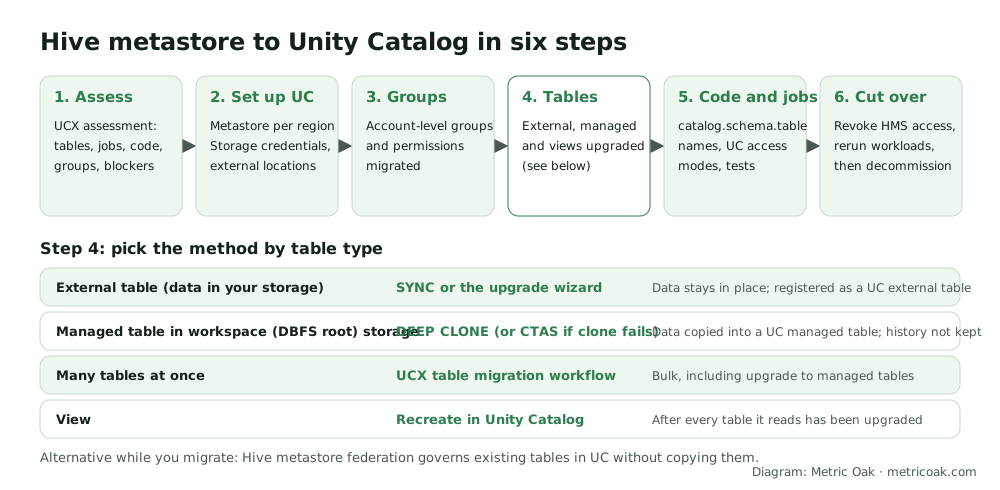
Step 4: Upgrade tables
Pick the method by table type:
| Table | Method | What happens |
|---|---|---|
| External (data in your own storage) | SYNC or the Catalog Explorer upgrade wizard |
Data stays in place, registered as a Unity Catalog external table |
| Managed, in workspace DBFS root | CREATE TABLE ... DEEP CLONE (CTAS if clone fails) |
Data copied into a Unity Catalog managed table; history starts fresh |
| Many tables at once | UCX table migration workflow | Bulk migration, including upgrade to managed tables |
| Views | Recreate in Unity Catalog | Only after every table they read has been upgraded |
-- External tables: preview, then run. SYNC can be rescheduled to pick up source changes.
SYNC SCHEMA main.sales FROM hive_metastore.sales DRY RUN;
SYNC SCHEMA main.sales FROM hive_metastore.sales;

-- Managed table in DBFS root: copy into Unity Catalog.
CREATE TABLE main.sales.orders DEEP CLONE hive_metastore.sales.orders;
Watch for: Hive commands that manipulate partitions directly are not supported on Unity Catalog managed tables, and SYNC writes bookkeeping properties to the source tables.
Step 5: Update code and jobs
- Change two-part names (
sales.orders) to three-part names (main.sales.orders), or set a default catalog per job. - Replace DBFS mounts and paths with Unity Catalog volumes and external locations.
- Move clusters and jobs to Unity Catalog access modes (standard or dedicated) on a supported runtime. A compute policy that fixes the access mode stops new non-compliant clusters appearing.
- Run each job’s tests against the upgraded tables before switching it over.
Step 6: Cut over and decommission
- Switch the wave’s jobs and dashboards to the Unity Catalog tables.
- Revoke access to the old Hive tables and rerun workloads. Anything that breaks still had a hidden dependency.
- Mark old tables as deprecated, keep them read-only for an agreed period, then drop them, unless a scheduled
SYNCstill updates them from that source. - Repeat for the next wave.
The short version
Assess with UCX, set up metastores, storage credentials and catalogs, move to account-level groups, then upgrade tables by type: SYNC for external tables, DEEP CLONE for managed tables in DBFS root, recreate views last. Update code to three-part names, prove the cut-over by revoking Hive access, and work in waves. Our data quality and governance team runs these upgrades, and our data platform assessment includes a readiness review.
Related: what is Unity Catalog, what is data lineage, how to set up Databricks compute policies and Databricks pricing explained.
Sources
- Upgrade Hive tables and views to Unity Catalog, Databricks documentation
- Use the UCX utilities to upgrade your workspace to Unity Catalog, Databricks documentation
- SYNC, Databricks SQL reference
Further reading from other practitioners
- Automating Unity Catalog upgrade workflows with UCX, Databricks
- From HMS to Unity Catalog: a self-service migration playbook, Databricks Community technical blog
Not sure where your own platform stands? Take the free 3-minute data platform scorecard, or see how we work on Databricks. Unfamiliar terms are explained in the data engineering glossary.