How-to
How to set up Databricks compute policies to control cost
A step-by-step guide to Databricks compute (cluster) policies: the seven rules that matter most, policy JSON examples for auto-termination, DBU caps, node types and required tags, one policy per environment, and how to roll them out.

Hemant Walchale
· 4 min read
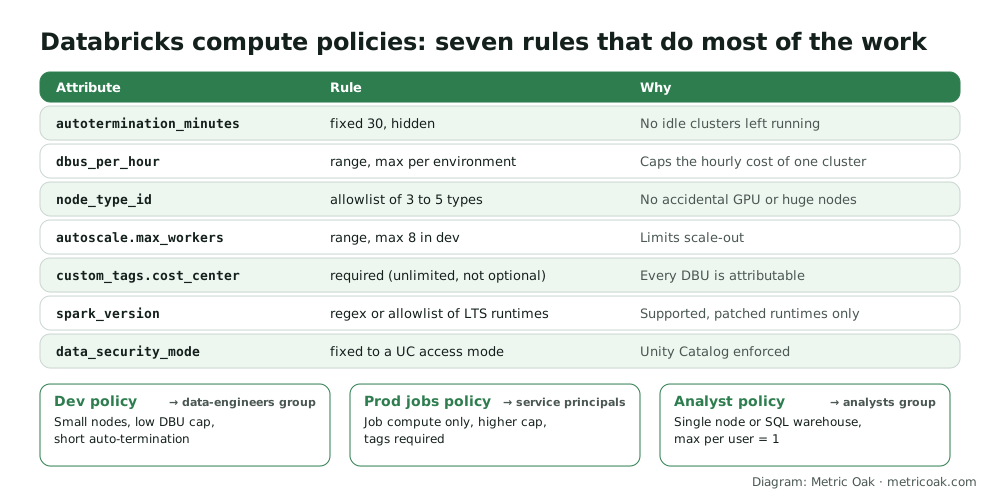
On Databricks, most surprise bills come from compute someone created and nobody constrained: a large cluster left idle overnight, GPU nodes picked by accident, an all-purpose cluster running scheduled jobs. Compute policies (formerly cluster policies) stop those at the moment of creation. They are free, take an afternoon to set up, and are one of the highest-return cost controls on the platform.
Step 1: Decide your policies before writing JSON
Start with three or four policies, not one per team:
- Dev / interactive: small node types, low DBU cap, short auto-termination.
- Production jobs: job compute only, higher cap, required tags, used by service principals.
- Analysts: single node or point people at SQL warehouses instead, one resource per user.
- Optionally ML / GPU: GPU node types allowed, granted only to the teams that need them.
Databricks policy families (templates such as Personal Compute, Shared Compute and Job Compute) are a good starting point: create a policy from a family and override the rules you need.
Step 2: Write the rules
Each attribute gets one rule type: fixed, forbidden, allowlist, blocklist, regex, range or unlimited. Add "hidden": true to remove a fixed field from the UI, "defaultValue" to pre-fill it, and "isOptional": true to make a limiting rule optional. A dev policy might look like:
{
  "autotermination_minutes": { "type": "fixed", "value": 30, "hidden": true },
  "dbus_per_hour": { "type": "range", "maxValue": 20 },
  "node_type_id": { "type": "allowlist", "values": ["m6i.xlarge", "m6i.2xlarge", "r6i.xlarge"], "defaultValue": "m6i.xlarge" },
  "autoscale.max_workers": { "type": "range", "maxValue": 8, "defaultValue": 4 },
  "custom_tags.cost_center": { "type": "unlimited", "isOptional": false },
  "spark_version": { "type": "regex", "pattern": "1[5-9]\\.[0-9]+\\.x-scala.*" },
  "data_security_mode": { "type": "fixed", "value": "USER_ISOLATION", "hidden": true }
}
Node types are cloud-specific (the example uses AWS names), and runtime patterns need updating as new LTS versions arrive. dbus_per_hour is a virtual attribute covering the driver and workers together, which makes it the simplest single cost cap.
Step 3: Set per-user limits
In the policy’s settings, set Max compute resources per user. One or two is right for most interactive policies. Lowering the limit later does not stop existing resources, so clean those up by hand.
Step 4: Grant policies to groups
Non-admin users only see policies they have been granted. Grant each policy to groups (data-engineers, analysts) or service principals, never to individuals. Then remove unrestricted cluster creation from everyone except admins, or the policies are only advice.
Step 5: Apply to existing compute and jobs
- Edit existing clusters and job definitions to use a policy; non-compliant settings show up for fixing.
- For clusters created through the API or Terraform, set
apply_policy_default_valuestotrueif you want policy defaults applied. - Move scheduled work from all-purpose clusters to job compute, which is billed at a lower DBU rate.
Step 6: Review monthly
Use the custom_tags.cost_center tag in the billing system tables to report spend by team, then tighten caps where usage is consistently far below them. Policies also enforce governance: fixing data_security_mode keeps every new cluster on a Unity Catalog access mode.
The short version
Create three or four compute policies (dev, production jobs, analysts), each with fixed auto-termination, a DBU cap, a node-type allowlist, a worker cap, required cost tags and a fixed access mode. Grant them to groups, remove unrestricted cluster creation, move scheduled work to job compute, and review spend by tag monthly. Our cloud data cost optimization service sets this up as part of a wider cost review.
Related: Databricks pricing explained, hidden costs on Databricks, Snowflake and Fabric, how to upgrade from Hive metastore to Unity Catalog, how to set up Snowflake resource monitors and a Databricks well-architected assessment.
Sources
- Create and manage compute policies, Databricks documentation
- Compute policy reference, Databricks documentation (rule types and attributes)
Further reading from other practitioners
- Best practices for cost management on Databricks, Databricks
- Databricks cluster policies for cost control, Espresso AI
Not sure where your own platform stands? Take the free 3-minute data platform scorecard, or see how we work on Databricks. Unfamiliar terms are explained in the data engineering glossary.